MCP Revision History Tools
Every saved change to a configuration object is kept as a revision, whether it was made in the console, through the Management API or through the MCP. Three tools let a model look back through those revisions and restore one.
Listing revisions
list_revisions with an object's type and id lists that object's saved revisions, newest first. Without a type and id it lists the revisions across QIE that the user may see. Each revision gives its number, when it was saved, who saved it, and how the change arrived:
| Value | Change arrived through |
|---|---|
CONSOLE |
The QIE console |
MCP |
An AI client using the MCP server |
MGMT_API |
The Management API |
SYSTEM |
QIE itself, through the system account |
HUB_JOB |
A step of a job the Remote Management Hub ran at this site, or a rollback of one |
HUB_MCP |
An AI client signed in at the Hub, calling through the Hub (see MCP Calls Through the Hub) |
HUB_CONSOLE |
A person signed in to this site's console through the Hub |
The three HUB_ values appear only at a site that accepts work from its Remote Management Hub, and the revision's user is the Hub user the change ran as. Revision History describes each value as the console's Via column shows it.
A list longer than one page comes with a nextCursor to send back for the next page.
Reading one revision
get_revision returns an object as one revision left it, field by field, as the console's revision history shows it. Secrets are never shown: a Management API token, an API key, OAuth2 payloads and tokens, static HTTP headers and a Google Cloud key file read as set or not set; a password inside a connection URL or custom parameters reads $secret; and the value of an HTTP header typed as fixed text is hidden. A channel's sample messages show their description and settings but not the message itself, which only the sample tools return. A channel's cache entries show their key, type and description, and their value only while Return message content is on.
Restoring a revision
restore_revision saves an object as one of its earlier revisions left it, as a new revision, so the change can itself be undone. The model sends the object's type and id, the revision number to restore from list_revisions, and the revision token get_object returned for the object as it is now; an object changed since is refused as stale.
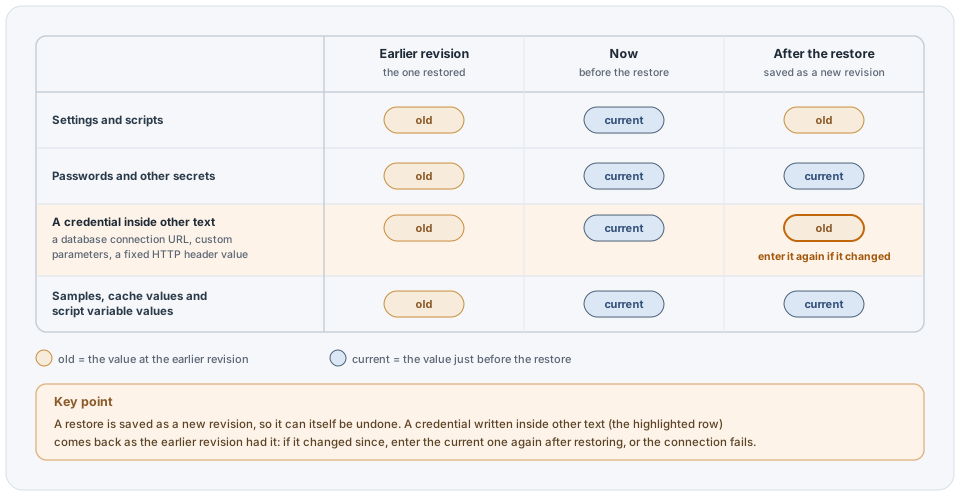
Some things stay as they are now, whatever the old revision held:
- Passwords and other secrets, because revision history does not keep passwords, and an old credential should not come back without anyone asking for it.
- A channel's samples, cache values and script variable values, which change only through the tools made for them.
A credential written inside other text is not a password field, so it comes back as the old revision had it: a password in a database connection URL, in FTP or Apache custom parameters, or in a fixed HTTP header value. If the credential was changed since that revision, enter the current one again after restoring, or the connection fails.
A revision taken while the object was in another zone is not restored; move the object in the console. If the old revision uses objects that no longer exist, QIE refuses the restore and names them. The restored object must pass every rule a save checks, and a channel that is running keeps running its current version until it is restarted.
Who can read revision history
The console's rule applies, checked against the object as it is stored: for an object in a zone, edit rights in that zone and a package state that allows its history to be viewed; for anything else, an administrator. In the list across QIE, each row is checked the same way, and Hub configuration revisions are never shown.